You’ve got all of these amazing ideas and thoughts rattling around in your noggin’, but you’re struggling to get them out in a logical manner. It’s overwhelming, right? You feel paralyzed because you don’t even know where to begin with sorting out the mess of brilliance you know is in your head. How do you map out a logical plan of action for your blogging tasks? How will you ever get past this stage of paralysis and onto blogging!?
This post will show you how to use mind maps for your blogging project using Taskade!
Jumpstarting your Blogging Project
First off, I want you to know that you aren’t alone. A lot of bloggers (myself included) struggle with analysis paralysis and just too many good ideas. You might be feeling like you don’t know where to start because the amount of work that comes with being a blogger is truly overwhelming.
That’s where Mind Mapping comes in, and it’s truly revolutionized how I get work done in my business – and I’m using Taskade to do it.
What is Mind Mapping?
Mind mapping is a highly effective way of getting all of that information (all of the ideas and thoughts) out of your head. I like it because it’s both creative and logical… so you get to use your whole bran to create a map of your ideas.
You might be thinking about the mind mapping of old where you use a sheet of paper and you make a mess that looks something like this…

Imagine being able to organize all of your thoughts and task into a more natural organizational structure. Now imagine being able to grab thoughts and move them around so that you can create a task list that’s efficient… never missing out on a single step.
Um, yes please!
Mind Mapping Tools
There are quite a few tools out on the market that you may have heard of such as Asana or Trello, but I’m using Taskade because I love that I can choose different templates based on my needs by project. One of those templates is specifically designed for mind mapping.
Here’s what one of my mind maps looks like for a course re-launch I’m putting together…

To you, this might look like a complicated mess (and to be fair, it should). This is what it looks like in my brain… and probably yours too. Taskade allows me to organize the work I need to do into easy to follow sections, sub-sections, sub-sub-sections… You get the idea. So basically, this is all of the stuff in my head right now, but it’s actually really well organized!
How to create your own Mind Map
I totally get how overwhelming this is. My hope is that how I do this is going to help you. Just know that there’s no one way to mind map – we’re all different! Don’t feel like you have to do it exactly as I do.
When I open up a new project in Taskade and choose to use their Mind Map feature, I get a template to start with that looks like this…

I LOVE this because it really gives you a good idea of how to start. Because what is a project really? – It’s made up of goals, inspirations, ideas, and tasks.
1. Name Your Project
Have you ever heard about how giving something a name gives it power? This is your moment. This is where you tell your brain “This is what we’re doing… we’re working on this specific thing” and there’s so, so much power in doing this. I’m not a psychologist, but I can tell you for sure that there’s a legit reason it’s easier to focus on a project if you name it.
The name doesn’t have to be anything clever. It could be as simple as “Favorite Duck Boots Post” or “Affiliate Marketing for Bloggers Course Re-Launch”. Just give it a name so your brain knows what you’re working on exclusively. I feel like it’s a way of telling the rest of your brain to shut up.
2. Decide your goals
Your goals don’t have to be anything scary or lofty. It doesn’t have to be sales related (although it could be). I choose goals that mean completing the project or what I ultimately want to see happen as a result of completing all of the tasks.
This is a great time to give yourself a due date as well. It’s not necessary for mind mapping, but it will keep you on track with completing your tasks and ultimately reaching your goal in time.

3. What’s your inspiration?
Inspiration can be anything really. This is a good time to leave yourself some notes. Have you been reading something that inspired you to think about this project? Maybe you saw an image on Instagram that inspired you. Whatever it is, this is where you put that down.
We get caught up on inspiration a lot, I think. It rattles around in our brain and mixes in with everything to the point of frustration. It becomes difficult to remember why we were inspired… or what about a blog post, image, meme, social media post, etc was so inspirational in the first place.
4. Write out your tasks
In this part of your mind map, you’ll list out all of the things you need to do. This part is arguably the most overwhelming, right? – Because it feels like there’s so much to do and you don’t really even know where to start.
The cool part about Taskade is that you can just go crazy listing them, and then move them around in a way that makes more sense. You don’t have to worry about it making any sense as you blast them out from your brain onto the screen. You can move them later!
Ready to start your own Mind Map?
You’re going to LOVE using Taskade to map out your blogging projects. It’s fun, easy to use, and did I mention you can sign up for free!?
How I created my own mind map
I know how much easier it is to do things when you have a working example, so that’s what I want to provide you with… an example mind map I put together (I already showed you above) and how I ultimately made sense of all of the tasks that felt overwhelming.
So here’s how I chose to break down this project based on what I knew I needed.
1. I named my project
This part was important, because giving it a name forced me to focus on this project and not think about the countless others I want to eventually work on.
I told myself “I’m working on everything I need to be doing to re-launch my Affiliate Marketing for Bloggers course, and ONLY that.” This really allowed me to ignore everything else… all of the blog posts I want to write, the unrelated projects, etc. I was only allowed to mind map based on this specific project.
2. I listed my goals
There’s 2 major goals for the project:
- The official re-launch of the course
- Reaching out to my affiliates
I gave myself a due date for these tasks. The major goal is the re-launch, of course… so I wanted to reach out to my affiliates 2 weeks before the launch in order to give them time to prepare.
3. I broke it down by platform
There’s a lot I wanted to do for this project and a lot of moving parts. I decided to make mini goals by focusing on creating a section for things like Instagram, or Facebook.
You can do the same thing if you’re working on a marketing campaign for a course launch or even a blog post. By doing this, you’re telling your brain “I need to do work for this project that involves this social media platform” – then you can break each down further.
4. I categorized the type of work to be done
What would I logically need for marketing the course on Instagram? I listed out a few areas I wanted to cover and make sure I had done work on:
- Stories
- Feed
- Ads
I broke it down this way because logically I would need different graphics and captions depending on what Instagram feature my audience was viewing. You could do the same thing for various aspects of your blog or marketing.
For example, if you were to create a section called “Pinterest”, you could list out your tasks as different headlines for the same blog post, or what boards you want to pin them to.
5. I listed out the tasks
Let’s look more closely at my Instagram tasks. I already mentioned that I broke it down into 3 task categories: Stories, Feed, and Ads. I use this to create some tasks for each.

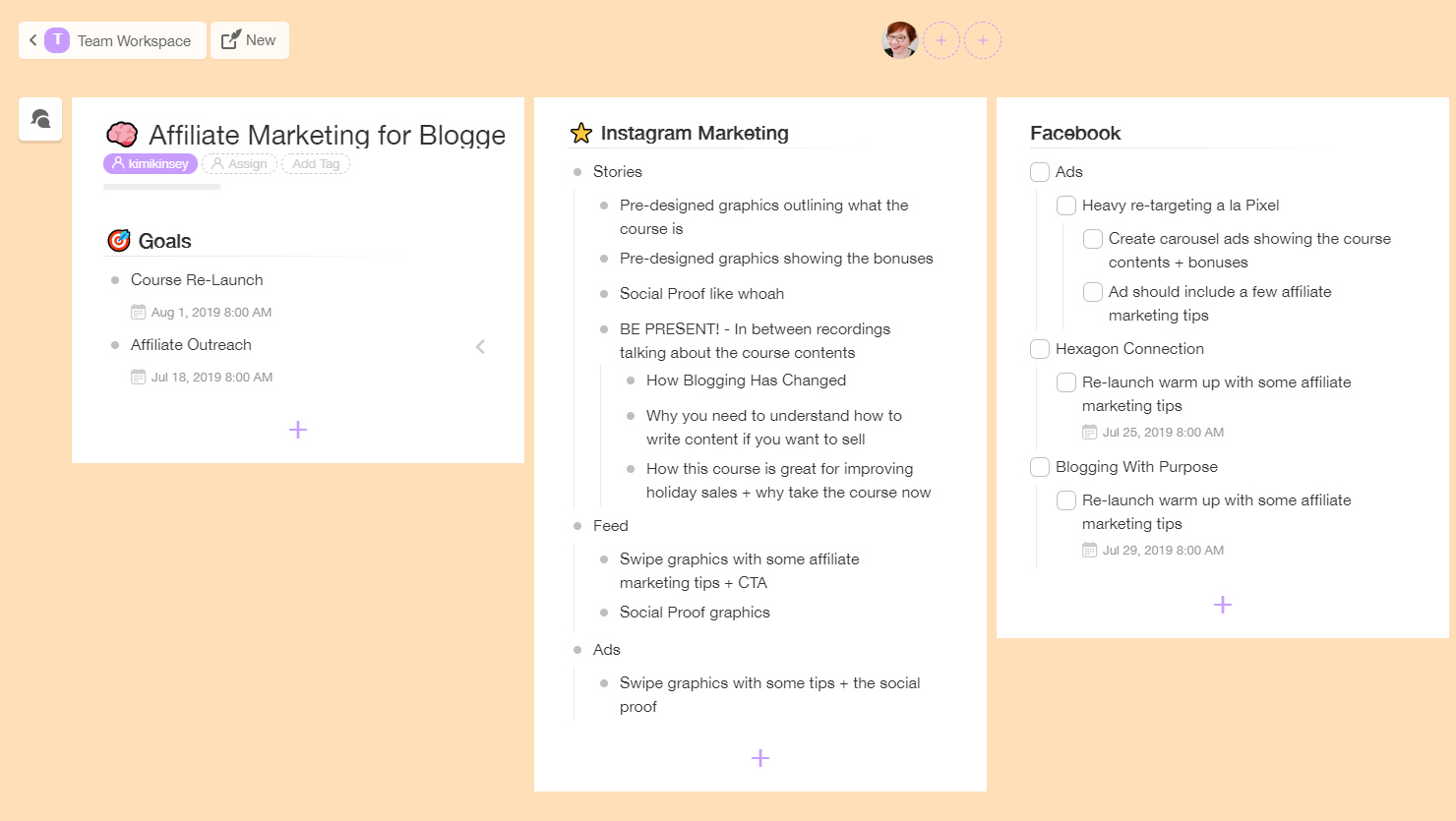
These are my tasks for Stories. I listed out tasks based on various aspects of the course so that I was sure to cover everything about it.
- Graphics highlighting course specifics
- Information about the bonuses
- Social proof from other happy customers
- Being present in my stories with recordings
You could even add a due by date to this if you need that accountability. You might also break these down even further into details regarding what you want those graphics to look like, or the information you want to be sure not to forget to mention.
6. Rinse, Repeat
You would map out the rest of your project much in the same way. You’re going to find that if you are clear about naming your project, choosing major goals, and breaking it down like this bit by bit, it’s going to be a lot easier to get it out of your head.
How to turn a mind map into a doable task list
I absolutely LOVE that Taskade can take even the messiest of mind maps and turn it into an actual task list – one that might make more sense for your brain (if this whole mind map template is ultimately not working for you in terms of completing the project).
In the upper, right-hand corner you can change the view from Mind Map to List, or a variety of other views – and you can switch back and forth all you want! I say, choose the view that ultimately feels right for you. I personally like a good ole fashioned list.
Regular List
The regular list is, well… what it sounds like. It’s all of your goals, sub-goals, and tasks broken down into sections as a vertical list of tasks that you can ticker or cross off.

Action View
Great view if you’re working with a team, or if you have set up a lot of due dates for various sections of a project.

Board View
You might be more familiar with this view if you’ve ever used something like Asana or Trello. Instead of tickering tasks as being completed, you could move them to a “Done” board, or create a board to be assigned to someone on your team.
Mind Mapping is fun – but takes practice
The first mind map I did was messy and it did take some practice for me to figure out what worked best for me. You might give my way a try, or you can choose to do it in a way that makes sense for how your brain works. There’s no right or wrong way so long as you are getting it all out of your head and onto the screen in a place like Taskade where you have complete control over moving all of your tasks around later.
What project will you mind map first!?

Don’t forget to Pin it!
If you enjoyed the content of this blog post and found it valuable, please save it to Pinterest so that other people can read it too!
CLICK HERE TO PIN IT


I’ve never thought of using a mind map for blogging before, it would certainly help get those ideas down! I do use them a lot for my day to day work though.
I write feature articles for a magazine and often use mind maps to get down all the facts and interesting points following the interview and then using that to decide which way the feature is going to go. It really helps seeing all the facts, figures and quotes written down and then using those to decide the main topic.